Subjects are an important part of setting up your school’s academic structure in SchoolX. Before you can work with subjects in your academic activities, you need to add them to your school.
How to add a subject
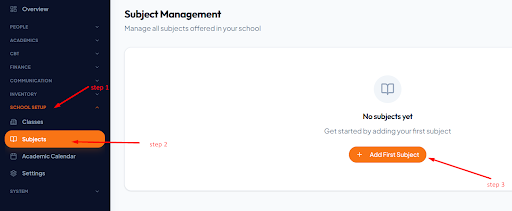
- Log in to your SchoolX account.
- From the dashboard, go to Setup.
- Select Subject.
- Click Add First Subject.
- Add the subject to your school.
Once the subject has been added, it becomes available as part of your school’s academic setup.